The carrier-ready roof report, before you are off the roof.
The phone already in your pocket becomes your inspection department. Roofing Expert
records what you found and prints it in the format a desk adjuster reads — every facing, every
penetration, every photo, in the same shape every time.
Roofing Expert stands on its own. A finished inspection can go to a public adjuster working in ClaimForge, or to your own company’s office — the dotted lines are destinations it may send to, not a pipeline it belongs to.
The homeowner's file is sealed and opens only with the security code its sender reads out, and so is an inspection sent to a public adjuster. An inspection sent to a roofing company's own office stays inside that company. Nothing about a claim or an inspection is uploaded to us: the apps have no accounts and no server of ours in the middle.
One trip, not three
The second climb is the expensive one. A required-shot checklist means the
photo you need is already in the file before you come down — and the report is built while you
are still standing on the slope, not typed up that evening from memory and a camera roll.
Evidence that travels
Every photo carries its GPS coordinates and
timestamp inside the file, and prints in an appendix with those captions. Not a phone
dump anyone has to take on faith. Sign the report on screen, and if it is changed after you sign, the PDF says so.
The same shape every time
Slope-by-slope counts across all eight
facings, in one consistent format, so the fourth submission of the week reads like the first.
A date of loss with a source
Recorded wind gusts and rainfall near
that address on that date, from public weather data, printed beside the finding they support —
rather than a homeowner’s recollection. A radar hail estimate adds the largest hail over the roof itself or, if none reached it, the largest nearby and how far away, with its source named.
Works with no signal
Capture, counts, signature and the PDF all work
offline. The property map and the weather check each take one lookup, then live in the report.
Count from your wrist
An Apple Watch companion for tallying on the
roof; counts sync to your phone when you’re back in range.
Deductible on the report
Enter the policy’s deductible and the
report shows it in dollars for reference. A percentage deductible works too: enter the percent and the Coverage A amount, and the report shows the arithmetic and the dollar figure. It does not interpret the policy.
What the inspection actually covers
Eleven sections, in the order you work. Nothing is a free-text box you have to
remember to fill.
1 · Job
Customer, claim, deductible, the four key dates and both
adjusters — on one page, not five. Can’t pin the date of loss? Storm Checker records the homeowner’s own memory of the storm first, then lists National Weather Service storm reports near the property for them to choose from. The app never picks, and the report prints who chose the date and the source.
2 · Material
A visual photo-grid picker for the roof
material.
3 · Damage
Tarp needed and its size, hail and wind shingle counts, test square,
leaks.
4 · Slopes
Eight facings, with damage-type counters on
each.
5 · Gutters
Gutters, drip-edge width, and solar: any existing array and the potential for one.
6 · Vents & penetrations
Counters for every penetration
type, with a custom size adder for what is not on the list.
7 · Details
Pitch, ridge vent, satellite and skylights.
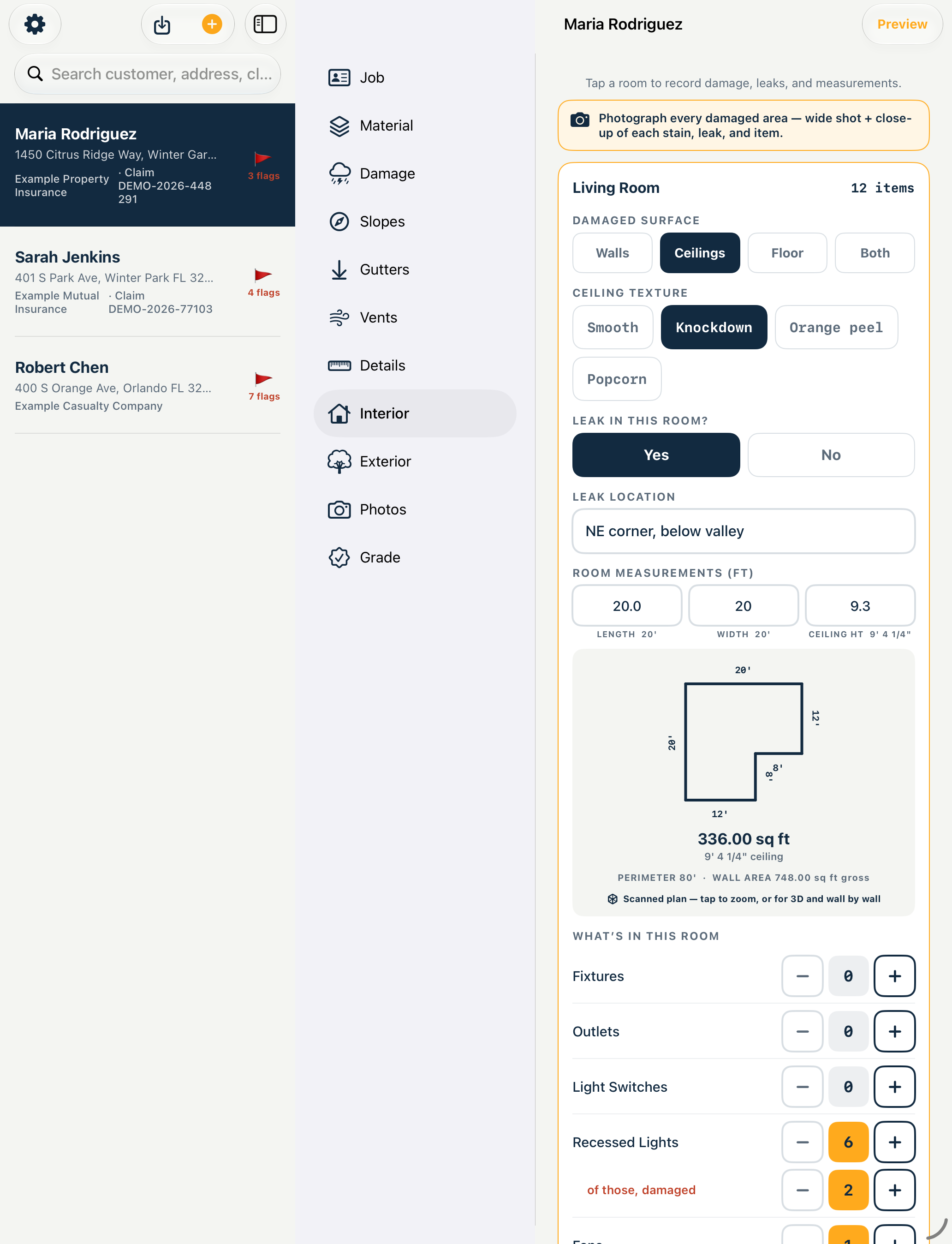
8 · Interior
Expandable rooms — surface, leak and its
location, dimensions, and a count of what is in the room.
9 · Exterior
Collateral damage outside, with notes.
10 · Photos
A required-shot checklist with a live count of
what is captured, in-app camera and thumbnails, so you can see what is still missing. Mark up a photo with arrows and circles while the original stays untouched, and fill empty captions from what you already recorded. Photos brought in from your library keep the date and place they were taken, and a photo saved without a location tells you so.
11 · Grade
Your recommendation and notes, then review and
save.
Your own letterhead sits above all of it: company name, address, phone, license
numbers and logo brand the PDF header exactly like your paper form.
Two ways out, and you choose
Roofing Expert stands on its own. A finished inspection can go to a public
adjuster, or to your own office — it is not part of anyone else’s pipeline.
Send to Public Adjuster
One action seals the whole inspection —
fields, photos, stamps, readings — into an encrypted file they open with a security code you
read to them. The file is useless without it.
Send to the office
Finished reports land in the office inbox —
every field, every photo, ready to correct and send under one shared letterhead. Review notes
instead of phone tag. A report package someone sends you opens from the Files app straight into your report list, with a check before it replaces a report you already have.
Got a crew? Add the Office
The Office subscription is the same app with admin rights: every report in the
company in one place, fields and photos you can correct, your letterhead on every crew report, and
control of who is on the team. A three-inspector shop with one person at the desk runs one Office
plus two Pro. Nothing is billed per seat, and setting up a company and inviting a crew costs
nothing extra.
Measure Room: the interior, measured by the phone
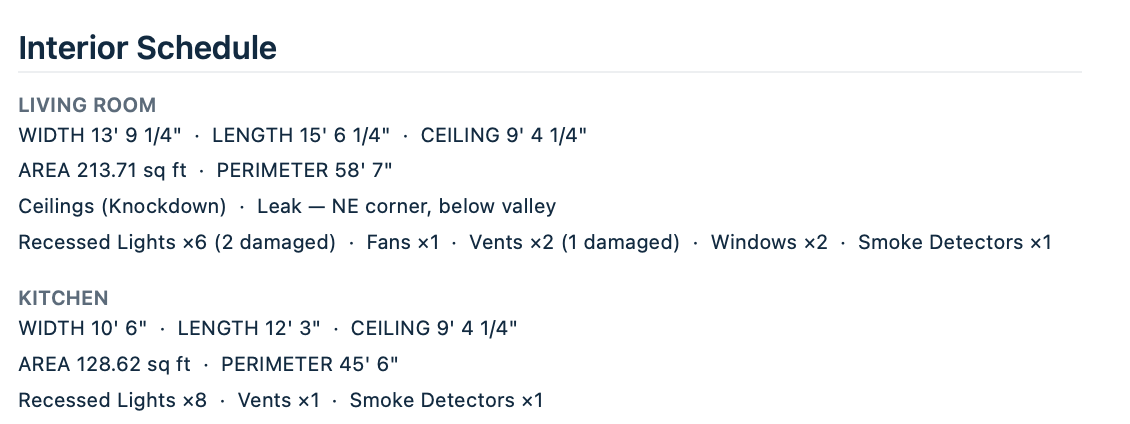
The roofer who is also the GC ends up doing the inside of the same claim:
square footage, ceiling height, windows and doors — then every fan, pendant, can light, AC vent
and smoke detector counted onto a clipboard.
That is what Measure Room is for: scan the room and the measurements come back. The fixtures you still tap in
yourself, because no scanner sees a ceiling fan — that part is a count, not a detection.
What you end up with is the interior schedule your supplement gets written from, not a pretty
floor plan.
What the scan gives you
Room square footage, ceiling height, windows
and doors.
What you count yourself
Fans, light fixtures, can lighting, AC vents,
smoke detectors. Apple’s room scan doesn’t detect these.
What it needs
Scanning needs LiDAR: an iPhone Pro (12 Pro or newer)
or an iPad Pro from 2020 or newer. Typed measurements work on any iPhone that runs iOS 17 or later, exactly as they do
today. Supports larger text sizes, and works with VoiceOver. Updated for iPhone Duo.
Your roof measurement does not change
A satellite trace, plus the
pitch you read on the slope. This is interiors only.
And what the adjuster receives: every room with its dimensions and what was in it,
damage marked.
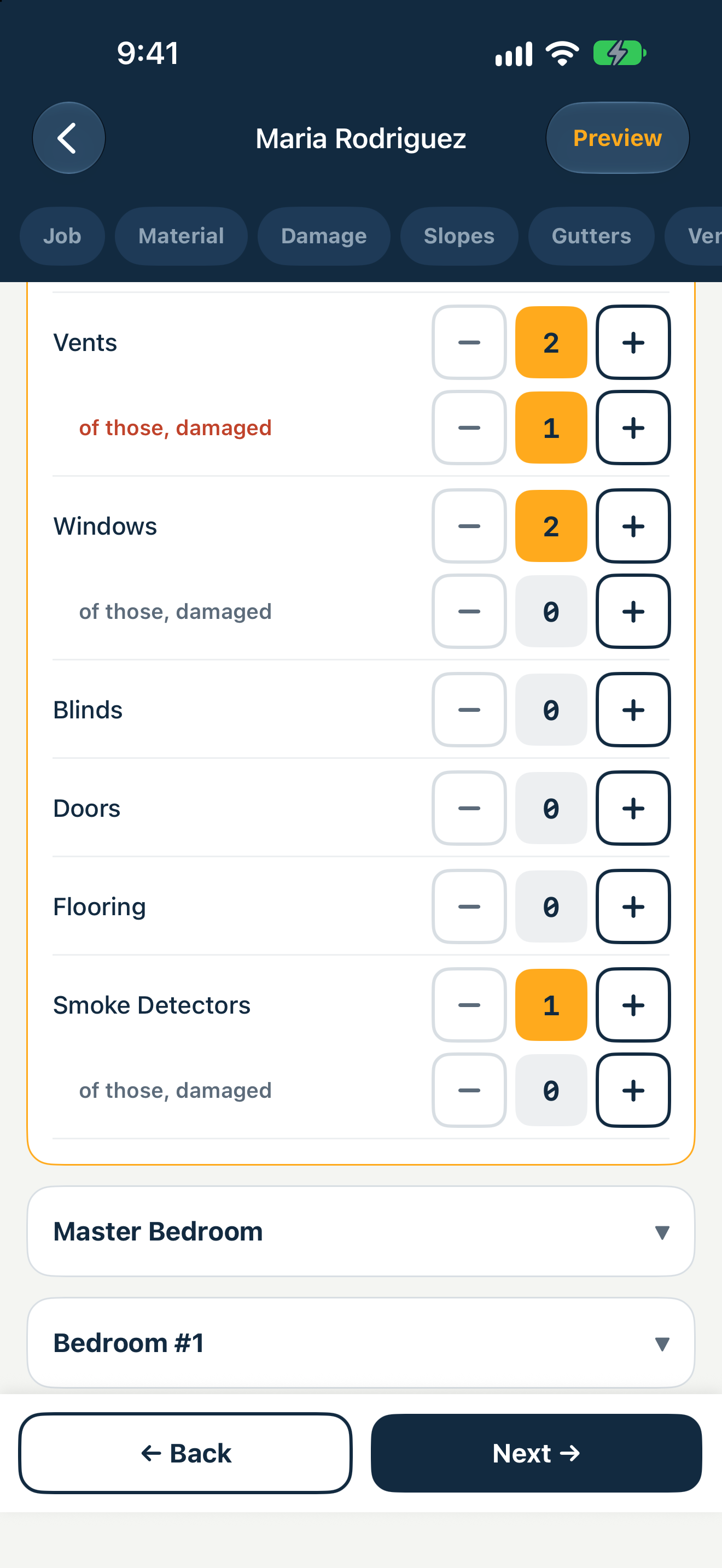
The interior schedule on the phone. The red row under a fixture is what makes it a
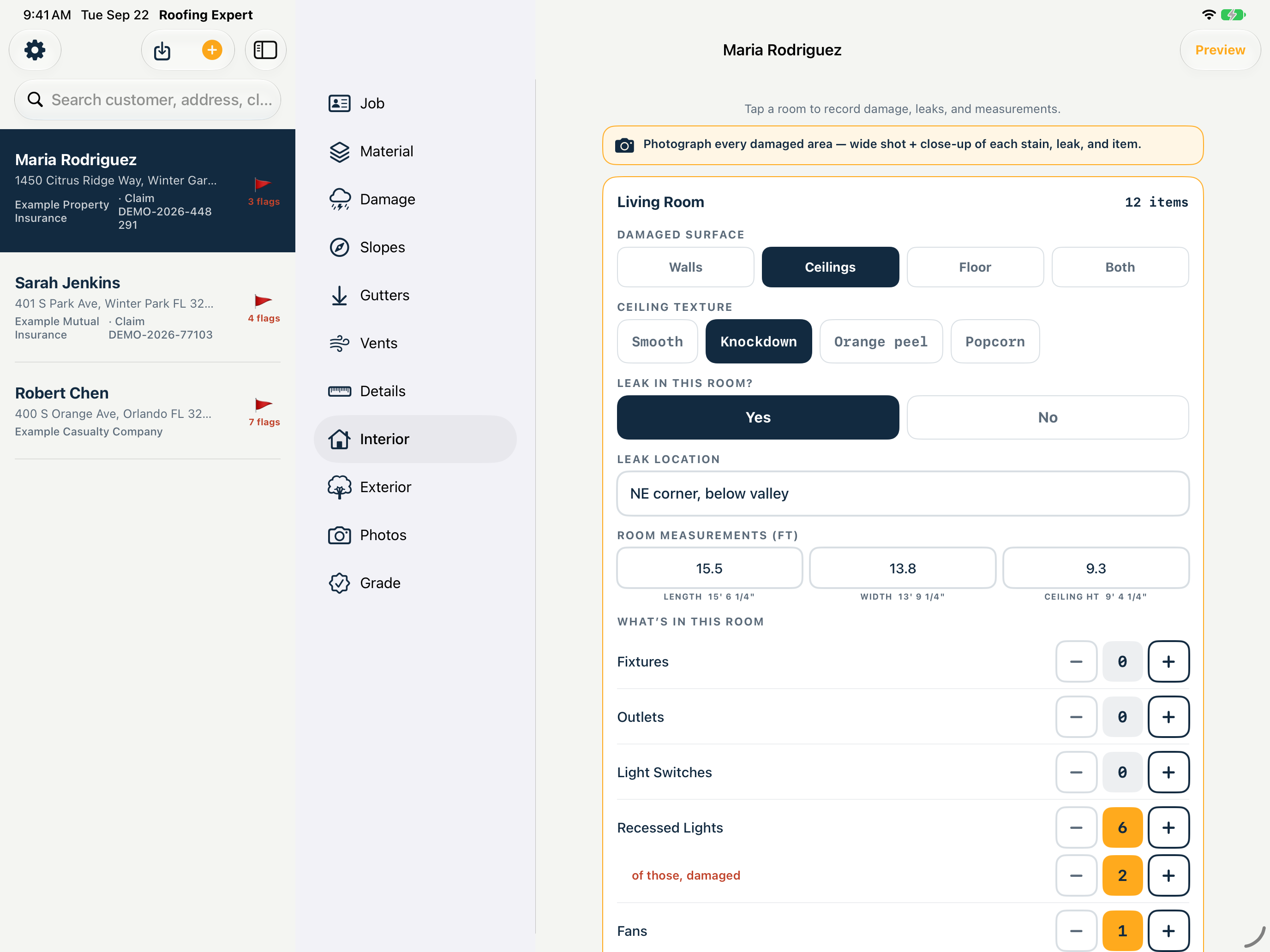
schedule rather than a floor plan: two vents, one of them damaged.The same claim on iPad — the report list, all eleven sections, and the open
room with its measurements and contents.
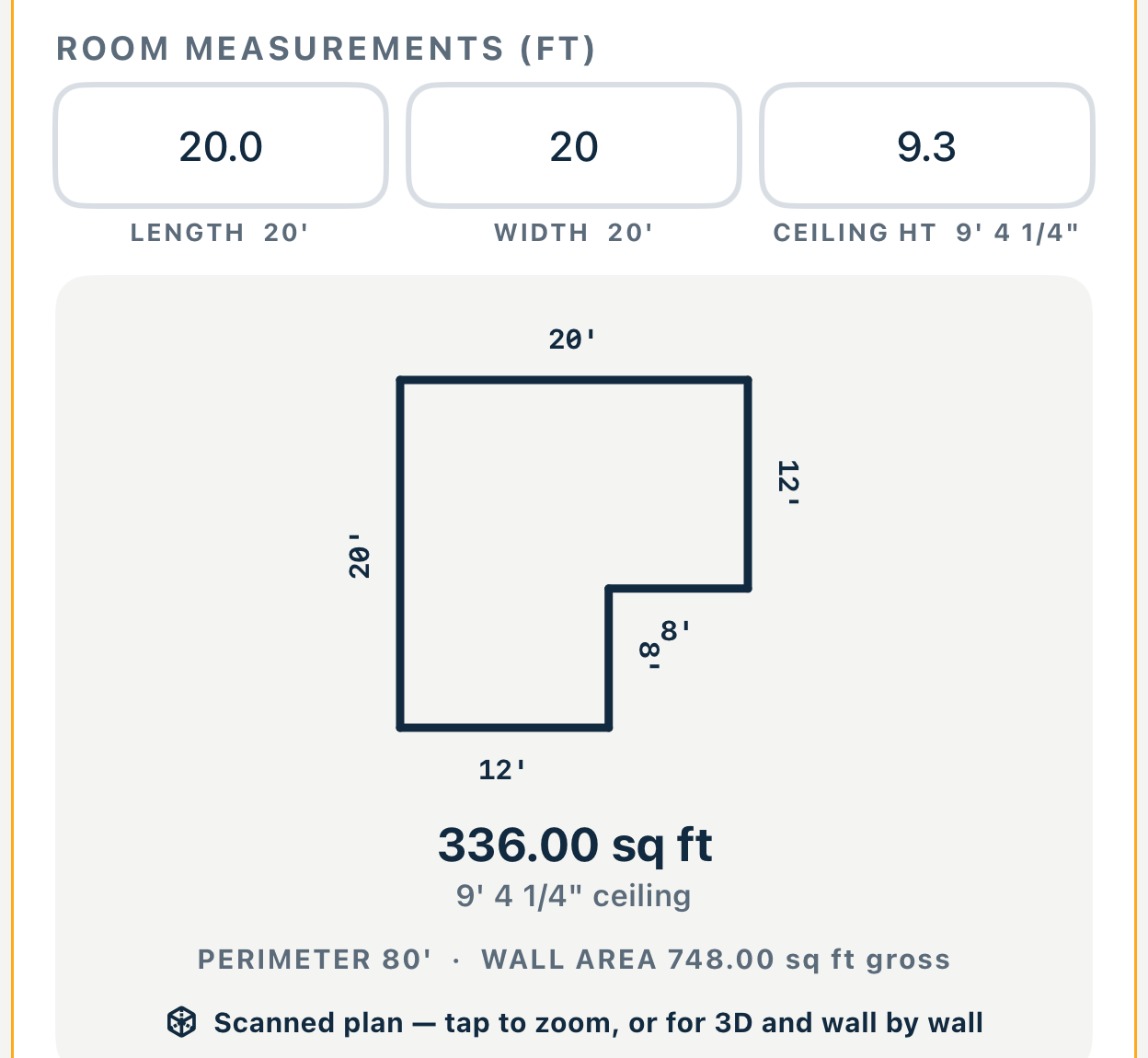
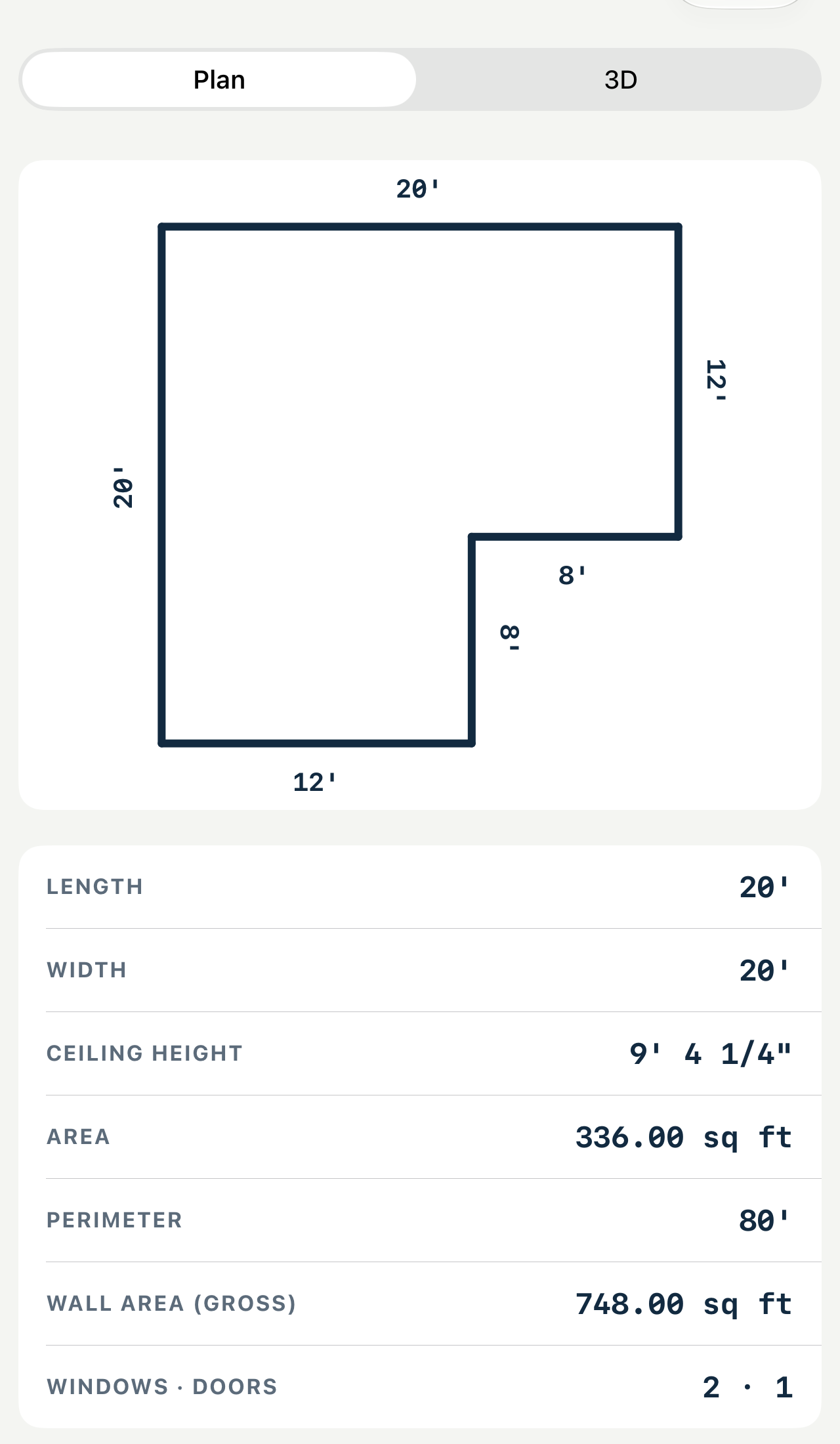
Twenty by twenty, and still not 400 square feet. The scan returns 336, because the
corner is bitten out. Perimeter and gross wall area come with it.
Tap the plan for the full schedule — area, perimeter, gross wall area,
windows and doors.The same plan, in the report it was measured for.
On the App Store now, in Roofing Expert.
What it costs
PRO · EVERY INSPECTOR
$29.99/mo
or $299.99 a year · first 3 reports free
OFFICE · THE DESK
$149.99/mo
or $749.99 every six months
No card to start, no minimums, no quote and no sales call. iPhone, iPad and Apple
Watch apps are included.
Roofing Expert on the App Store ↗
What this app does not do
It does not interpret your policy
It records what you found. What
any of it means for a claim is your adjuster’s or attorney’s job.
It is not a compliance product
It makes no claim to satisfy any code,
permit or inspection requirement. That is your jurisdiction’s call.
Nothing is uploaded to us
No account, no server of ours in the
middle, no analytics. The map, weather, storm-report and hail radar lookups are its only outside calls; optional sync and crew sharing use your own iCloud.