

LOSSLIST · ROOFING EXPERT · CLAIMFORGE

One claim, from the roof to the adjuster's desk.

A property claim is one story told three times — by the homeowner, by the person on the roof, and by the office that assembles it. These three apps tell it once. Each works on its own. Together, nothing is re-typed between them.

Watch the walkthroughs

Three apps. Open the one that’s yours.

Each is its own app on the App Store, and each works on its own — you do not need the other two.

Roofing Expert is a standalone field app that can send to either office Roofing Expert sits on its own between the two offices it can feed, belonging to neither. The dotted lines are what say so: they are destinations it may send a finished inspection to, not a pipeline it is part of. Tapping Send to Public Adjuster hands the sealed inspection to a public adjuster working in ClaimForge, who also opens the homeowner's LossList file and assembles one report for the carrier. Sending to office hands it to the roofing company's own office, where the same app with admin rights collects every crew report in one place and exports the finished report on the company's letterhead, for the company to send to whoever it chooses. A solid line runs back from that office to the field carrying review notes, solid because it always happens rather than optionally. HOMEOWNER LossList Contents, photos, receipts STANDALONE — SENDS TO EITHER OFFICE ON THE ROOF Roofing Expert Slopes, hits, pitch, measurements, photos Carrier-ready PDF before you are off the roof Pro · iPhone · iPad · Watch TO A PUBLIC ADJUSTER PUBLIC ADJUSTER ClaimForge Both files open into one claim You approve every figure · iPhone · iPad · Mac CARRIER Desk adjuster TO A ROOFING COMPANY'S OFFICE THE OFFICE Roofing Expert The same app, with admin rights Every report in the company, in one place Review notes instead of phone tag Your letterhead on every crew report Manage who is on the team Office · iPhone · iPad FINISHED REPORT Branded PDF Yours to send — you decide who receives it sealed file + code Send to Public Adjuster send to office review notes back one PDF export
The homeowner's file is sealed and opens only with the security code its sender reads out, and so is an inspection sent to a public adjuster. An inspection sent to a roofing company's own office stays inside that company. Nothing about a claim or an inspection is uploaded to us: the apps have no accounts and no server of ours in the middle.

Three apps, three jobs, one file each way

Every screen below is the real app.

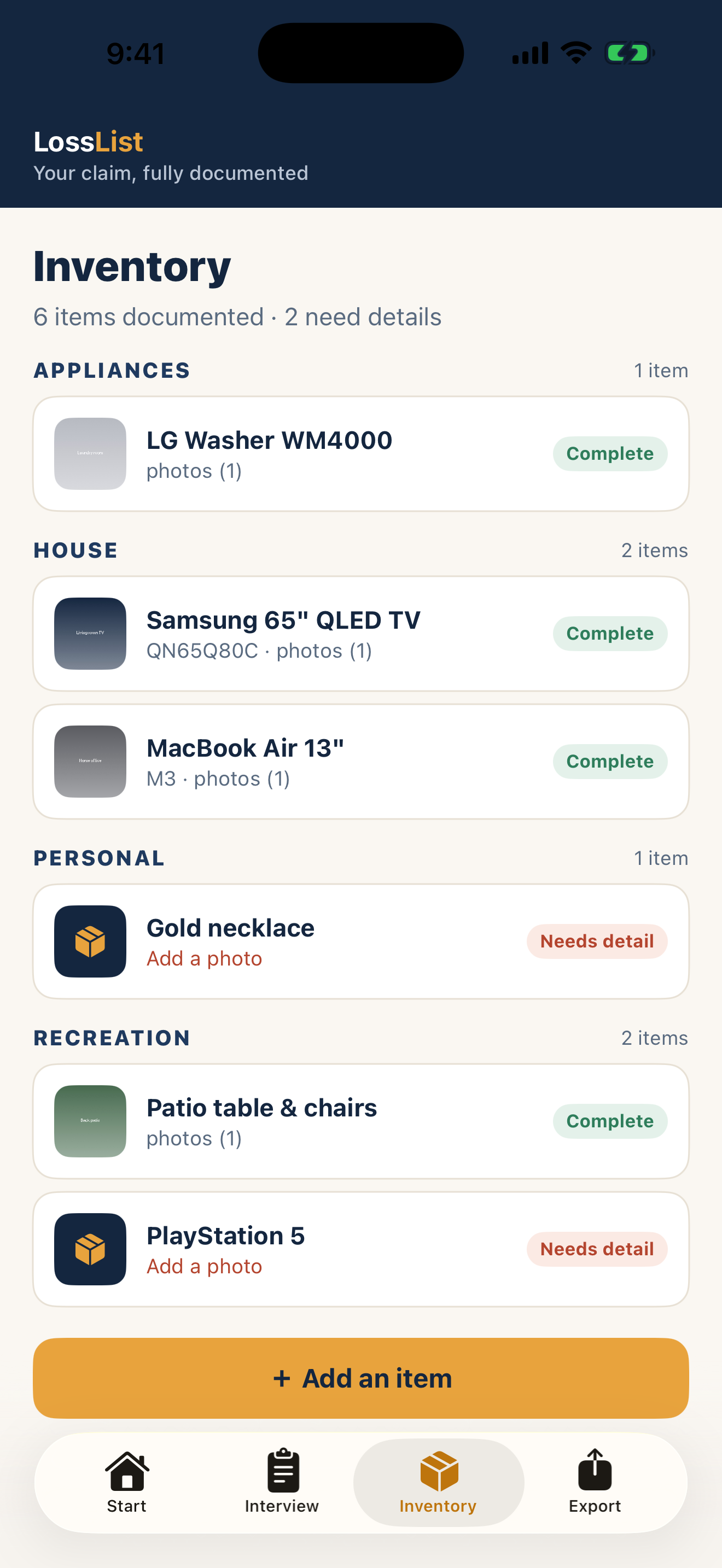
LossList inventory screen listing documented items by category

1 · THE HOMEOWNER

LossList documents the loss

A guided interview for the kind of loss it was, then the contents: photos, receipts, serial numbers, where and when each thing was bought. It asks the questions in the order an adjuster asks them, so nothing is remembered too late.

iPhone · iPad

LossList in detail →
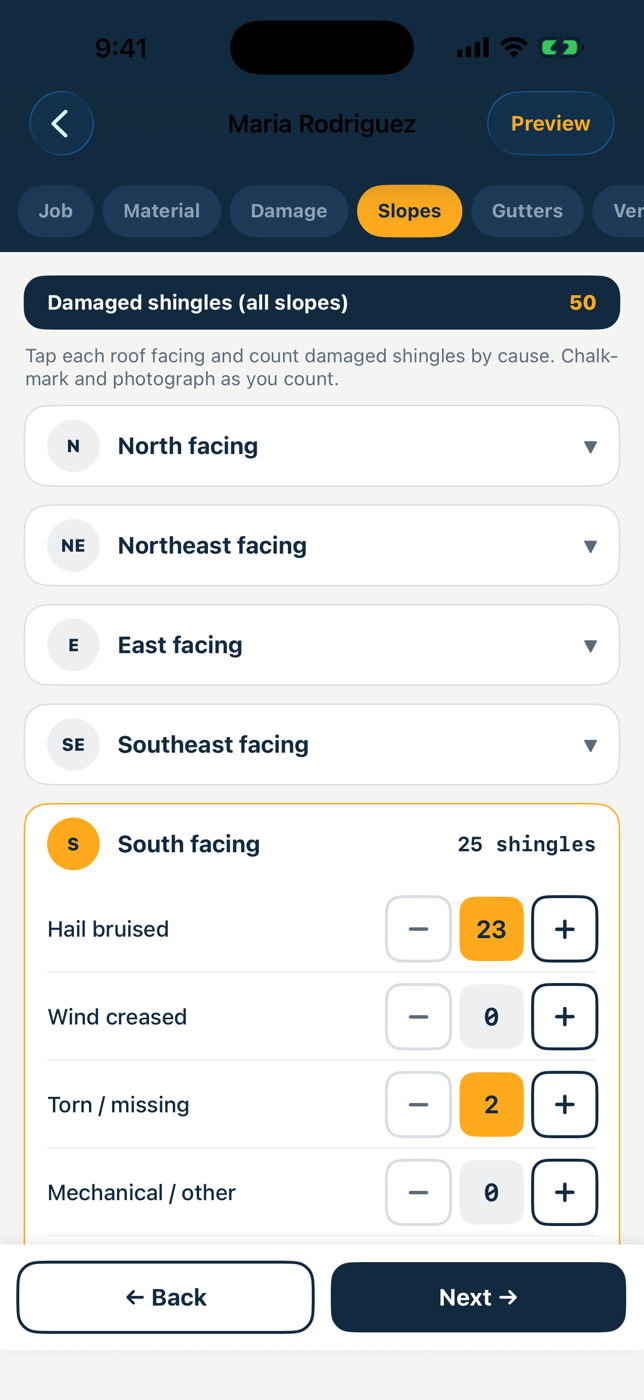
Roofing Expert slope damage counters

2 · THE INSPECTOR

Roofing Expert documents the roof

Slope-by-slope counts on all eight facings, hits per test square, GPS- and time-stamped photographs, the recorded wind and rain for the date of loss, and a carrier-ready PDF before you are off the roof.

iPhone · iPad · Apple Watch

Roofing Expert in detail →
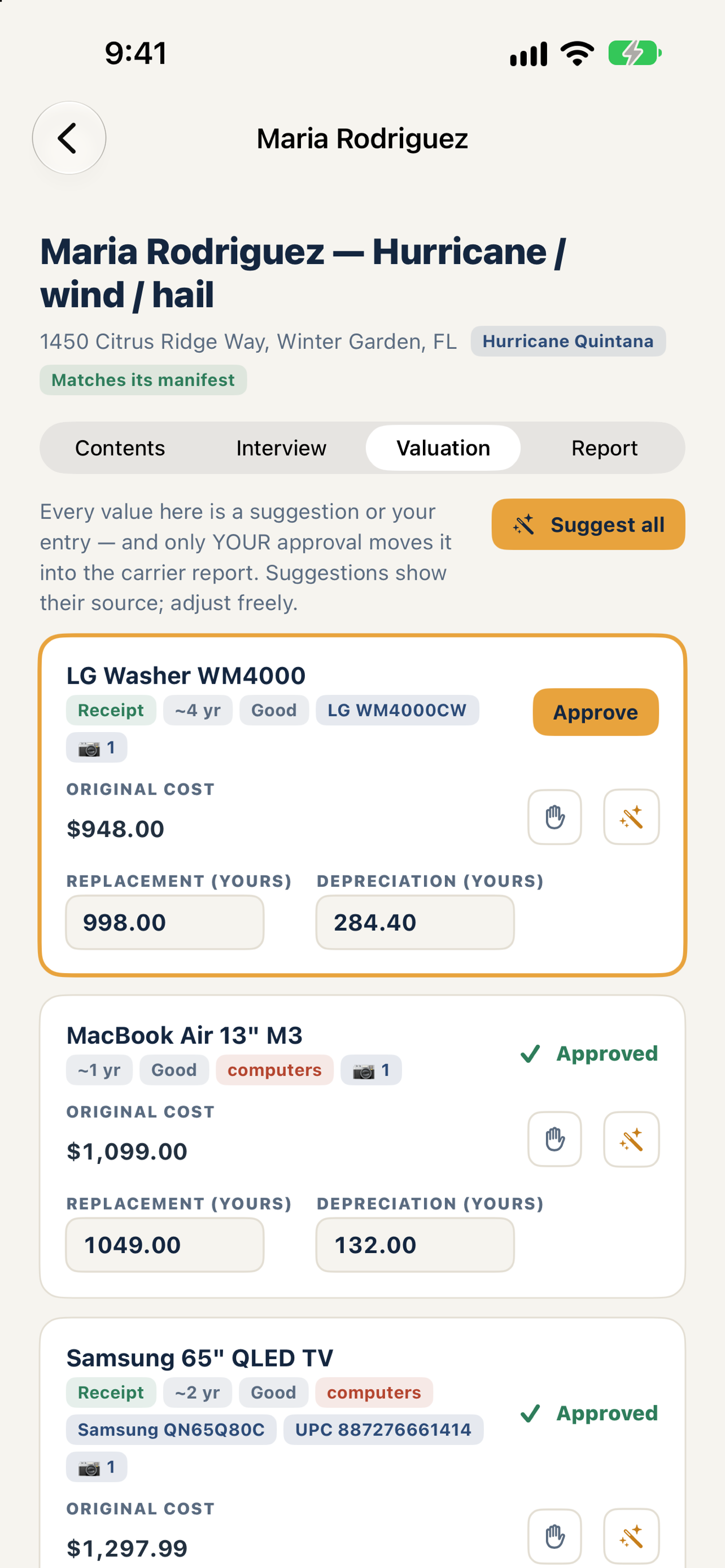
ClaimForge valuation screen with sourced suggestions awaiting approval

3 · THE PUBLIC ADJUSTER

ClaimForge assembles the claim

Both sealed files open into one workspace. Contents arrive itemized with their photos; the structural scope drafts itself from the inspection. Valuation figures are suggestions with their source shown, and nothing reaches the report until you approve it.

iPhone · iPad · Mac

ClaimForge in detail →

Watch it work

Captioned, no narration. One film per role.

For roofers — inspection to sealed file
For public adjusters — two sealed files, one claim

For roofers: the report that answers first

Roofing Expert is an inspection-documentation tool. It records what you found and prints it in the format a desk adjuster reads — it is not a CRM.

Evidence that travels

Every photo carries its GPS coordinates and timestamp inside the file, and prints in an appendix with those captions.

The same shape every time

Slope-by-slope counts across all eight facings, in one consistent format, so the fourth submission of the week reads like the first.

A date of loss with a source

Recorded wind gusts and rainfall near that address on that date, from public weather data, printed beside the finding they support.

Count from your wrist

An Apple Watch companion for tallying on the roof; counts sync to your phone when you’re back in range.

Works with no signal

Capture, counts, signature and the PDF all work offline. The property map and the weather check each take one lookup, then live in the report.

Send to Public Adjuster

One action seals the whole inspection — fields, photos, stamps, readings — into a file the adjuster opens with a security code.

Measure Room: the interior, measured by the phone

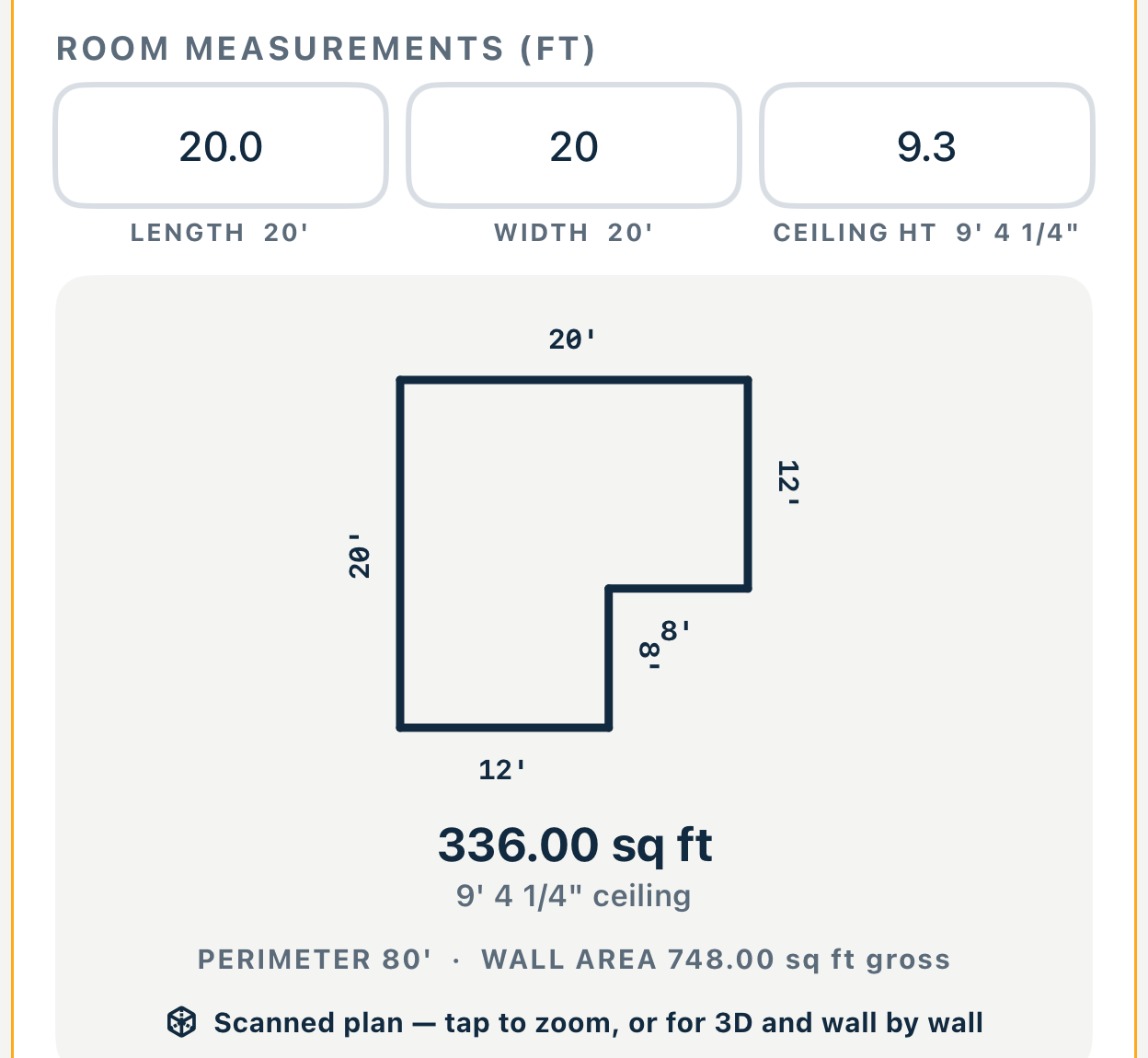
The roofer who is also the GC ends up doing the inside of the same claim: square footage, ceiling height, windows and doors — then every fan, pendant, can light, AC vent and smoke detector counted onto a clipboard.

Scan the room and the measurements come back. The fixtures you still tap in yourself, because no scanner sees a ceiling fan — that part is a count, not a detection. What you end up with is the interior schedule your supplement gets written from, not a pretty floor plan.

Scanning needs LiDAR: an iPhone Pro (12 Pro or newer) or an iPad Pro from 2020 or newer. Typed measurements work on any iPhone that runs iOS 17 or later, exactly as they do today.

Your roof measurement does not change: a satellite trace, plus the pitch you read on the slope.

Measure Room is on the App Store now, in Roofing Expert.

The room card after a scan. Length 20 feet, width 20 feet, ceiling height 9 feet 4 and a quarter inches. An L-shaped plan drawn to scale with each wall dimensioned — 20, 12, 8, 8, 12 and 20 feet — and beneath it 336.00 square feet, perimeter 80 feet, wall area 748.00 square feet gross.
A real scan, from the app. Twenty by twenty, and still not 400 square feet: the corner is bitten out, so the room is 336. More on the Roofing Expert page.
PRO · EVERY INSPECTOR
$29.99/mo
or $299.99 a year · first 3 reports free
OFFICE · THE DESK
$149.99/mo
or $749.99 every six months

A three-inspector shop with one person at the desk runs one Office plus two Pro. Nothing is billed per seat. Setting up a company and inviting a crew costs nothing extra. Roofing Expert on the App Store ↗

For public adjusters: nothing re-keyed, every figure yours

ClaimForge opens the homeowner's LossList file and the Roofing Expert inspection, and assembles one report for the desk adjuster. You decide every number in it.

Two files in, one claim out

Contents with photos, receipts and serial numbers; the structural scope drafted from the inspection; the loss interview verbatim.

Suggestions, never verdicts

Replacement figures come with their source shown and depreciation from published useful-life tables. Approve, adjust or override each line; nothing enters the report unapproved.

Your sections stay yours

The coverage determination and the adjuster narrative are written by you. The app assembles facts; you adjust the claim.

The policy never enters

ClaimForge never receives, stores or interprets the policy. You request it from your client and make every coverage call yourself.

Desk work on the Mac

A native Mac app: claim and report side by side in separate windows, keyboard review, drag a file in from Finder.

Files checked on import

Every file in a package is checked against the package's own manifest as it opens, and the workspace says what that check found.

CLAIMFORGE PRO
$149.99/mo
or $749.99 every six months
PER CLAIM
$79.00
to open a client’s file; the subscription covers everything after
TO TRY IT
Free
download and look around; the subscription unlocks import and report generation

One subscription covers iPhone, iPad and Mac. No per-seat contract, no quote, no sales call. ClaimForge on the App Store ↗ · ClaimForge support

For homeowners: write it down while you still remember

LossList is self-help documentation software. You operate it; it does not act for you.

A guided interview

Questions built for the kind of loss you had — wind and hail, water, flood, fire and smoke, theft, vandalism, lightning — asked one at a time.

Room by room, item by item

Photos, receipts, serial numbers, where and when you bought it. Scan a barcode and the item’s name and brand fill themselves in.

Your declarations page, read back

Photograph it and LossList transcribes the named fields for you to correct. The photo is not saved, and the app never tells you what any of it means for your claim — that is your adjuster's or attorney's job.

It stays on your device

No account, no server, no analytics. The only thing the app sends is a barcode you scan, to look up an item, aside from Apple’s own purchase check.

Two ways out

A sealed file your adjuster opens with a code you read to them, and a printable PDF summary you can send to your carrier yourself.

The file is yours

Two ways out, one free, one paid. Re-export as often as you update the claim.

LOSSLIST
Free
download, interview, inventory, and the sealed file for your adjuster
PRINTABLE SUMMARY
$79.00
one time, not a subscription
You are in charge of your claim. LossList is a self-help documentation tool. It does not act on your behalf, contact your insurance company, interpret your policy, or advise you on coverage. For claim representation, consult a licensed public adjuster or attorney.

LossList on the App Store ↗ · LossList support

What these apps do not do

No policy forms

Neither app ingests, stores or interprets an insurance policy. LossList can transcribe named facts off a declarations page you already own, and shows them back for you to correct.

No promises about outcomes

Nothing here says what a claim will pay. The apps document; people decide.

No accounts, no servers of ours

Claim content stays on the device. Roofing Expert's optional crew and device sync use your own iCloud account, never ours.